# Bybit API

ByBit

1. **Login / Signup** to Bybit via browser
2. Make sure your account is **verified / KYC**
3. You will need to create a **new Sub-account** for the Automated Trading System, please follow these steps bellow: <br>

   3.1. Hover your mouse to “**Profile Icon”**

   3.2. Click **“Switch/Create Account”**\
   \
   ![](https://2435970581-files.gitbook.io/~/files/v0/b/gitbook-x-prod.appspot.com/o/spaces%2FdKc8y0hpOzx7lwtsUOZc%2Fuploads%2F6D1aoLMPNBR1I3IqqDfY%2Fimage.png?alt=media\&token=d6667524-2e1e-464c-b2af-54079c08cf0d)

   \
   3.3. Click **“Create”**\
   \
   ![](https://2435970581-files.gitbook.io/~/files/v0/b/gitbook-x-prod.appspot.com/o/spaces%2FdKc8y0hpOzx7lwtsUOZc%2Fuploads%2FBXp0kEgefn5deDL4Ub5j%2Fimage.png?alt=media\&token=26c08092-a9ba-4577-9f5b-04163601e8e0)

   \
   3.4. Enter your **preferred username** and select **“Unified Account”**\
   3.5. Enter your **“Security information”** \
   3.6. Account Created Successfully!!!, Click **“Skip”**\
   \
   ![](https://2435970581-files.gitbook.io/~/files/v0/b/gitbook-x-prod.appspot.com/o/spaces%2FdKc8y0hpOzx7lwtsUOZc%2Fuploads%2F0JcQ96iho71V2dscdP1Y%2Fimage.png?alt=media\&token=468ab2cd-3c7a-444e-a3ca-dac5a17730e0)<br>
4. **Switch your account** to the Sub-account from the **“Profile Icon”** on the top left corner

<figure><img src="https://2435970581-files.gitbook.io/~/files/v0/b/gitbook-x-prod.appspot.com/o/spaces%2FdKc8y0hpOzx7lwtsUOZc%2Fuploads%2FOvCrd3Vn3gxKBcBBX6uF%2Fimage.png?alt=media&#x26;token=f8e56abe-dd54-408f-8e25-52fbb8f75e4d" alt=""><figcaption></figcaption></figure>

5. Hover your mouse to your initials and select “API”\
   \
   ![](https://2435970581-files.gitbook.io/~/files/v0/b/gitbook-x-prod.appspot.com/o/spaces%2FdKc8y0hpOzx7lwtsUOZc%2Fuploads%2FS8N0CQ18SvBCcHKujUms%2Fimage.png?alt=media\&token=26d83a01-0f90-4d8f-8630-388927a0f916)<br>
6. Click **“Create New Key”**<br>

   <figure><img src="https://2435970581-files.gitbook.io/~/files/v0/b/gitbook-x-prod.appspot.com/o/spaces%2FdKc8y0hpOzx7lwtsUOZc%2Fuploads%2FXxrUEISbZx5d62NLqC8U%2Fimage.png?alt=media&#x26;token=026fc6b6-d932-4381-8199-07966510c668" alt=""><figcaption></figcaption></figure>
7. Select **“System-generated API Keys”**\
   \
   ![](https://2435970581-files.gitbook.io/~/files/v0/b/gitbook-x-prod.appspot.com/o/spaces%2FdKc8y0hpOzx7lwtsUOZc%2Fuploads%2FM96JnViSZKoMU1LZt1Ff%2Fimage.png?alt=media\&token=567426b5-d1fb-4ce0-afb3-42967b8c2fe5)<br>
8. Create New Key\
   \*\*\* We will need all these settings and information to connect the API to our server, make sure all information is easy for you to remember and backed-up \
   \
   6.1. Select **“API Transaction”** \
   6.2. **Name for the API Key:** enter format **(Your username)ODS** \
   6.3. **API Key Permissions:** Select **“Read-Write”** \
   6.4. Select **“No IP Restriction”**\
   \
   ![](https://2435970581-files.gitbook.io/~/files/v0/b/gitbook-x-prod.appspot.com/o/spaces%2FdKc8y0hpOzx7lwtsUOZc%2Fuploads%2FBe1IlIY8eJgmXVLJyq8m%2Fimage.png?alt=media\&token=2ee743c5-3da5-4270-90c6-c1dc6b673705)<br>
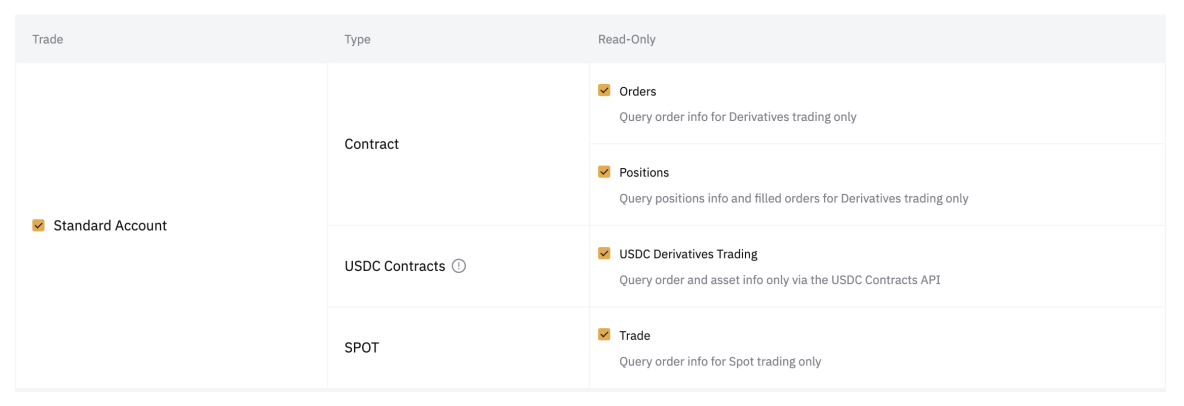
9. **Trade:** \
   \
   7.1. Select **“Standard Account”** \
   7.2. Make sure these are Ticked: **“Orders”, “Positions”, ‘USDC Derivatives Trading” & “Trade”**<br>

   <figure><img src="https://2435970581-files.gitbook.io/~/files/v0/b/gitbook-x-prod.appspot.com/o/spaces%2FdKc8y0hpOzx7lwtsUOZc%2Fuploads%2FACeCm5HuhpFo7Sme2cMs%2Fimage.png?alt=media&#x26;token=0c08eccb-f0bf-4ae6-8a58-ffb94cb8a5e7" alt=""><figcaption></figcaption></figure>
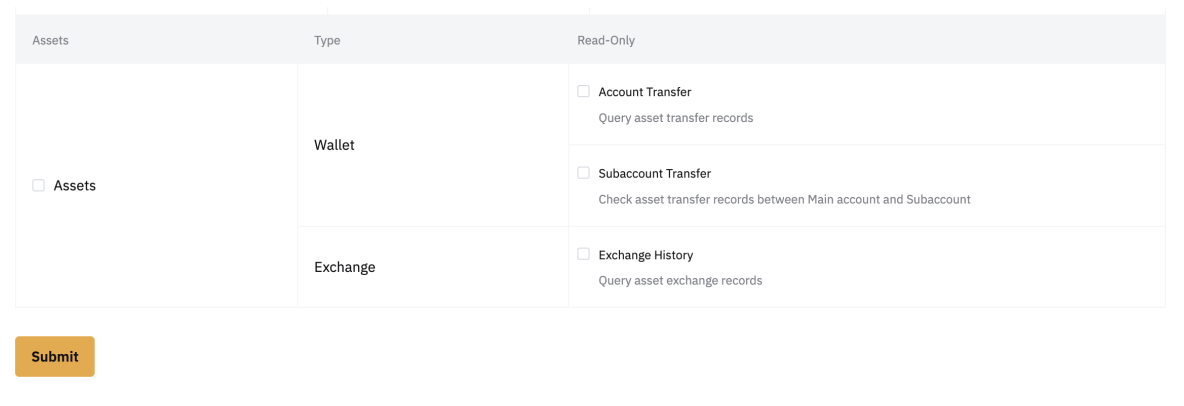
10. Assets: \
    8.1. Make sure **“Assets”** are **Unticked**\
    8.2. Nothing should be ticked on **“Account Transfer”, “Subaccount Transfer” & “Exchange History”**\ <br>

    <figure><img src="https://2435970581-files.gitbook.io/~/files/v0/b/gitbook-x-prod.appspot.com/o/spaces%2FdKc8y0hpOzx7lwtsUOZc%2Fuploads%2FDut9TWQtOdeCQg2jWfCz%2Fimage.png?alt=media&#x26;token=2ddab03e-bc02-4ac9-a490-a7e49a9ddde8" alt=""><figcaption></figcaption></figure>

8.3. Click **“Submit”**&#x20;

9\. Pop-up appears, **Copy & Paste** all the details to the form

<div align="left"><figure><img src="https://2435970581-files.gitbook.io/~/files/v0/b/gitbook-x-prod.appspot.com/o/spaces%2FdKc8y0hpOzx7lwtsUOZc%2Fuploads%2FL4YEAMfIdnd5MjKgfMkk%2Fimage.png?alt=media&#x26;token=b4e09f70-4cdc-4fdb-b02c-982eb7382ac5" alt="" width="375"><figcaption></figcaption></figure></div>

10\. Click **“Understood”** and now you have **successfully created your ODS API.**